
ICC paper profiles for soft proofing
Download the Redcliffe profiles for every paper in our range — and preview, on your calibrated screen, exactly how your image will print.
An ICC profile is a small data file that describes exactly how a particular paper, printer and ink combination reproduces colour. Loaded into image-editing software alongside your artwork file, the profile lets you soft proof — see on a calibrated monitor a close approximation of what the final print will actually look like.
You'll find a profile below for every paper we offer. The files are free to download, and assuming your monitor is calibrated, they work just as well for our papers printed at any Redcliffe-compatible colour workflow.
To soft proof, you'll need image-editing software that supports ICC profiles — Adobe Photoshop is the industry standard. Download the profile for your chosen paper, install it (instructions below), and open it in Photoshop via View → Proof Setup → Custom.
Every Redcliffe paper, ready to download
Grouped by mill. Click any Download button to save the ICC file to your computer.
Hahnemühle
Germany · 425+ years of archival fine art papermaking
Canson Infinity
France · 450+ years of papermaking heritage
St Cuthberts Mill
Somerset, England · Papermaking since the 18th century
Awagami
Tokushima, Japan · Traditional washi papermaking with kozo mulberry fibres
-
Washi Unryu Thin 55gsmDownload
Redcliffe
Our own-brand archival watercolour paper — an excellent value option for open editions
-
Redcliffe Watercolour 210gsmDownload
Two-minute installation
On a Windows PC
- Close any graphics software before installing.
- Download the ICC profile — it'll appear in your Downloads folder.
- Right-click the file and select Install Profile. Windows handles the rest automatically.
- Restart your graphics software. The profile will be available in Photoshop's proof setup menu.
On a Mac
- Close any graphics software before installing.
- Download the ICC profile.
- Move it to the ColorSync profiles folder:
HD › User › Library › ColorSync › Profiles - Restart your graphics software. The profile will be available in Photoshop's proof setup menu.
Setting up your proof
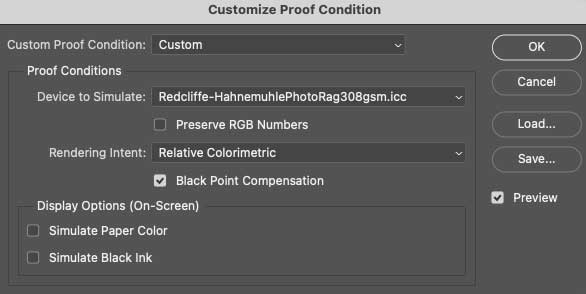
Once the profile is installed, open your image in Photoshop. From the View menu, choose Proof Setup → Custom.
In the Device to Simulate dropdown, pick the Redcliffe profile for the paper you're planning to print on. Leave Rendering Intent on Perceptual or Relative Colorimetric — perceptual tends to flatter images with strong saturated colours; relative colorimetric preserves as much accuracy as possible while clipping only out-of-gamut tones.
Tick Simulate Paper Color to preview the paper's natural tone under your image — a subtle shift, but important for accurate soft proofing, especially on warm watercolour papers.
Click Save… at the bottom of the dialog to store the proof view as a preset. Next time you work with the same paper, you can recall the setup in two clicks rather than rebuilding it from scratch.
Not sure which profile you need?
Choose a paper type, a rendering intent, or a workflow — we can walk you through it on the phone in a few minutes. The advice is always free.
✆ 0117 952 0105Ready to print?
Once your file is looking good on your calibrated screen with the right profile loaded, place your order and we'll match what you've seen as closely as our presses can manage.