Adobe Lightroom
The default choice for serious photographers. Mobile and desktop sync seamlessly — edit on your phone, finish on your laptop. RAW handling is best-in-class.
Subscription, around £10/month
A practical guide for artists
A short, no-nonsense guide for artists who’d rather not learn ten years of photography to take one good photograph of a painting.
Order a Sample PackWhen DIY is fine
For social media, your shop listings, newsletters, and even a lot of giclée print files — a recent phone or camera, natural light, a tripod, and twenty careful minutes will get you there. The five steps below cover what we’ve learned from forty years of receiving artwork files from artists.
A second option
Some work doesn’t lend itself to home photography. Pieces larger than A3, paintings with heavy texture or raised elements, and any artwork in a small studio without space to step back — all are tricky to photograph well at home.
Send the original to us and we’ll digitise it in our Bristol studio, lit and squared properly. Up to A3 we scan. Anything above A3, we photograph.
Scanning & Copying service →The Five Things That Matter
An overcast day or near a north-facing window is ideal. Avoid direct sunlight (harsh) and indoor bulbs (colour cast). Turn off room lights so the only light source is natural.
Even slight camera shake softens detail. A tripod is the cheapest single upgrade you can make. Use a 2-second self-timer or a remote so the act of pressing the shutter doesn’t wobble the camera.
The lens needs to be straight on to the artwork — not above it, below it, or off to one side. If the work is tilted back slightly on the easel, tilt the camera the same amount to match. If you don’t, the artwork comes out slightly squashed in the photo, and it’s fiddly to fix afterwards.
Flash creates hot-spots and kills the texture of paper or canvas. If your camera has zoom, use the optical kind — move the camera physically closer rather than digitally zooming, which loses detail. Most cameras and phones do this automatically when set to "auto", so don’t overthink it.
"RAW" means your camera saves everything it sees, rather than compressing the image down to a smaller JPEG. It gives you far more to work with later if you need to adjust the colour. Modern iPhones (ProRAW), recent Pixels, and any DSLR or mirrorless camera have a RAW option somewhere in the settings. Worth finding it.
Yes, your phone is good enough
After more than 45 years of digitising artwork, here’s a thing that surprises us regularly: the phone in your pocket is genuinely good enough for most of what you’ll need. iPhones from the 14 Pro onwards (and Pixel 8 and later) shoot ProRAW files with full 48-megapixel detail and proper colour information. For social posts, shop listings, even smaller giclée prints — a recent phone in good light is genuinely indistinguishable from a DSLR file.
The same care that goes into a DSLR shot still applies — but you don’t need to think of yourself as a photographer to apply it.
What to edit with
The default choice for serious photographers. Mobile and desktop sync seamlessly — edit on your phone, finish on your laptop. RAW handling is best-in-class.
Subscription, around £10/month
One-time purchase, no subscription. Made by Serif in Nottingham. Powerful, professional, and a genuine alternative to Photoshop without the monthly fee.
One-time purchase, around £70
Free, browser-based, no installation. The Pixlr E version handles layers and basic colour correction well. Good for occasional edits where Lightroom would be overkill.
Free; Premium tier optional
Still the gold standard for advanced retouching, complex masking, and detailed colour correction. Worth it if you’re editing artwork files for print regularly, or doing serious cleanup on scanned originals.
Subscription, often bundled with Lightroom
Checking your colour
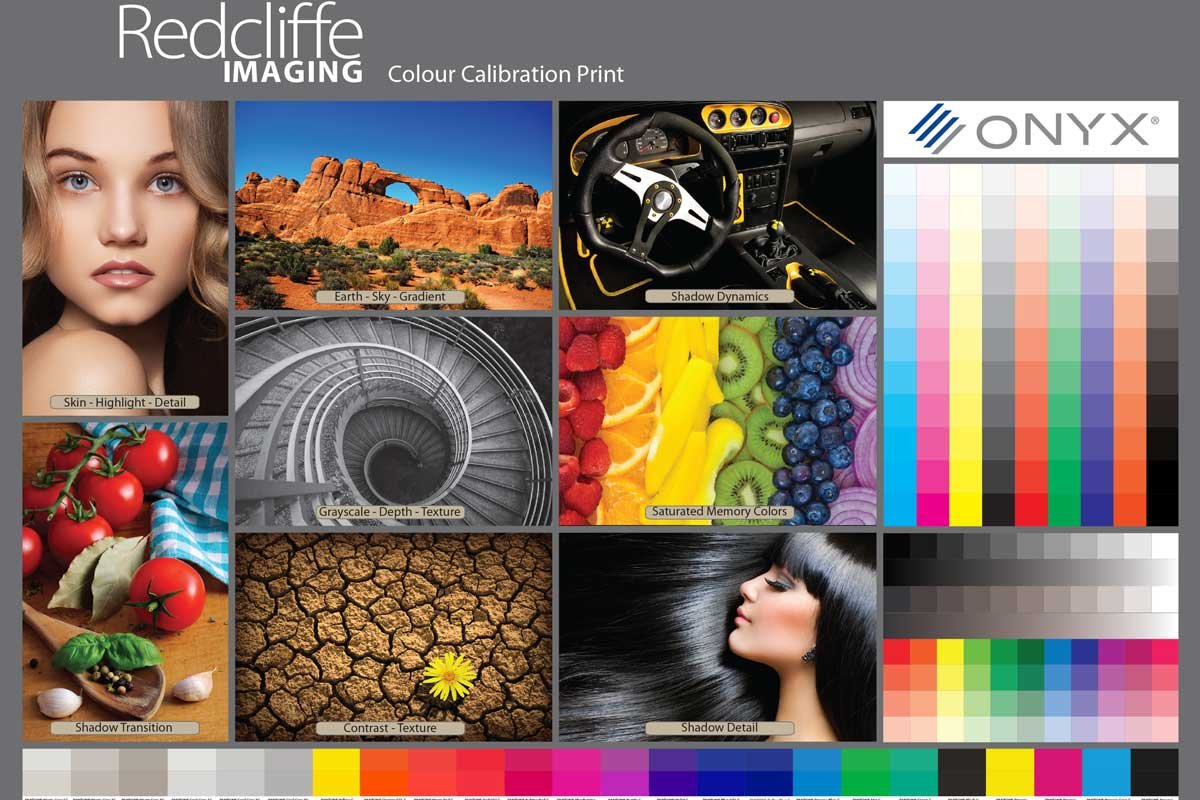
The fastest way to know if your camera, your monitor and your printer are all telling the truth about colour is to hold a professionally-printed reference next to them. We include a Redcliffe Colour Calibration Print in every sample pack — full skin tones, gradient skies, saturated memory colours, full CMYK and greyscale ramps.
Order a pack and you’ll have it on your studio bench in a few days — the calibration print plus our complete range of archival fine art papers to feel and test under your own light. A small fee covers postage and the printed papers themselves.
Order a Sample PackFree service
Send us your image and we’ll review it for resolution, colour space, and printability at the size you’re considering. There’s no charge, no obligation, and we’ll flag anything that needs adjusting before a single print is made.
Free File Check →Email or call — advice is always free, and we’d rather you ask first.